Dialogue graph editor for branching quests and game dialogue

Dialoqra is a dialogue graph editor and quest design tool built for real production needs.Build branching dialogue, quest conditions, variables, and outcomes in a system where everything stays visible and connected - not buried in documents or scripts.Collaborate across teams, iterate safely, and keep full control over dialogue logic from early concepts to final in-game integration.

Build dialogue graphs as real game systems

Create branching conversations in a visual dialogue graph editor while managing quest conditions, variables, and outcomes in one connected system. Everything stays structured, visible, and easy to reason about - even at scale.

Collaborate with real version control

Work in organizations with up to 50 members. Track changes, use locks, commits, and structured revisions to prevent overwrites and keep your dialogue stable across the team.

No more endless scrolling

Find anything instantly - no more digging through huge documents. A clear, visual structure makes dialogue easy to navigate, edit, and manage from anywhere, on any device.

Built for

Writers, quest designers, narrative leads, and content reviewers

Dialoqra works as a quest design tool for node-based quests and dialogues, making branching logic easy to read at a glance, simple to edit, and much easier to implement in-game.

Narrative design

Design branching conversations, NPC behaviors, and pacing in a visual format the entire team can easily understand and review.

Quest design

Use one quest design tool to map dialogue, conditions, rewards, and outcomes before they move into implementation.

Team review

Open any graph, trace every path, and instantly understand changes - all within a unified system for writers, collaborators, and production workflows.

Production control

Manage writers and collaborators in one workspace, monitor progress through changelogs and commits, and keep production work visible as dialogue moves toward implementation.
Interactive sample

Try dragging a real dialogue graph

This sample dialogue graph editor canvas shows the actual interaction model: dialogue nodes, a branch, and a condition wired together in one readable flow.

Dialogue testing

Try out your dialogue before it ever gets shipped

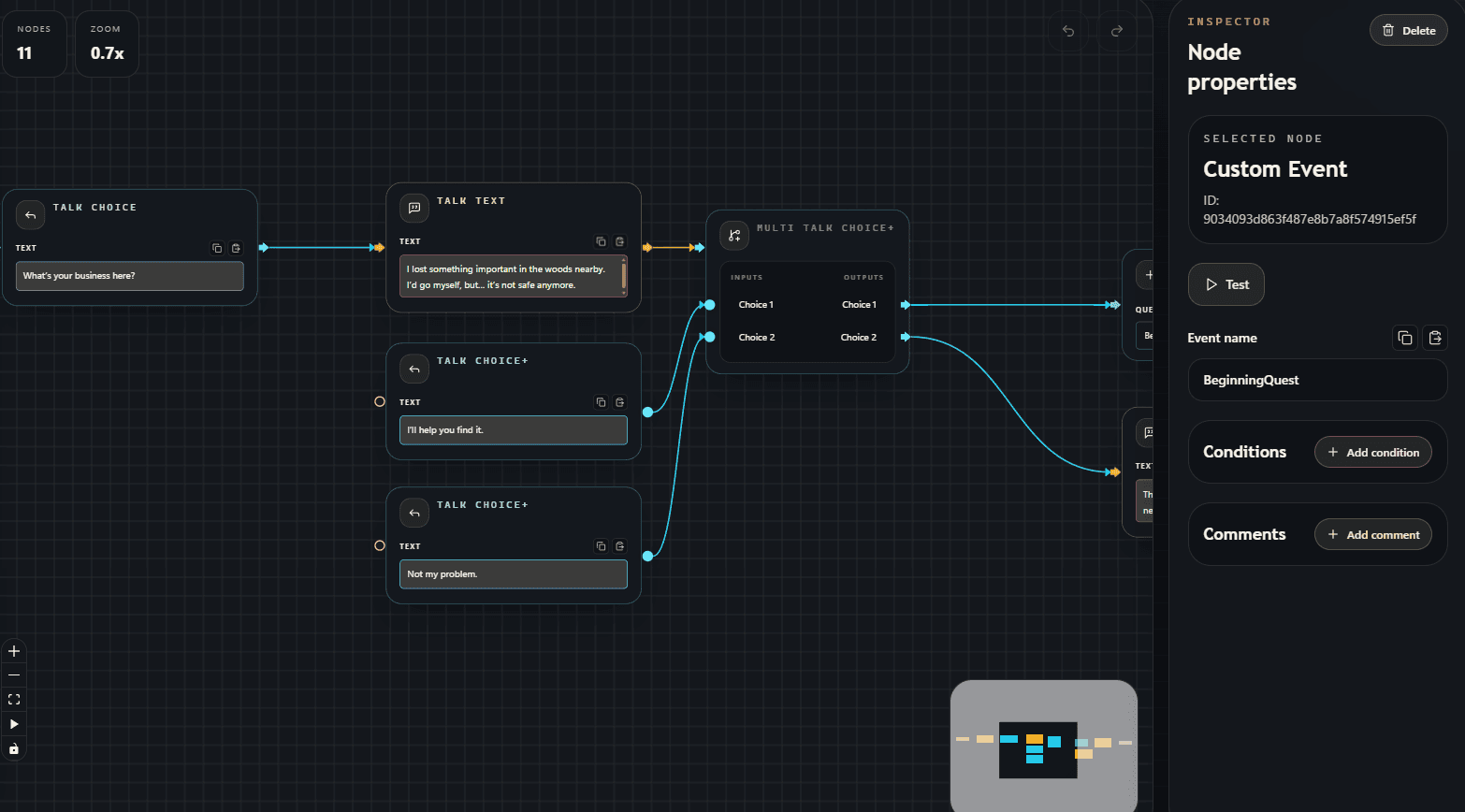
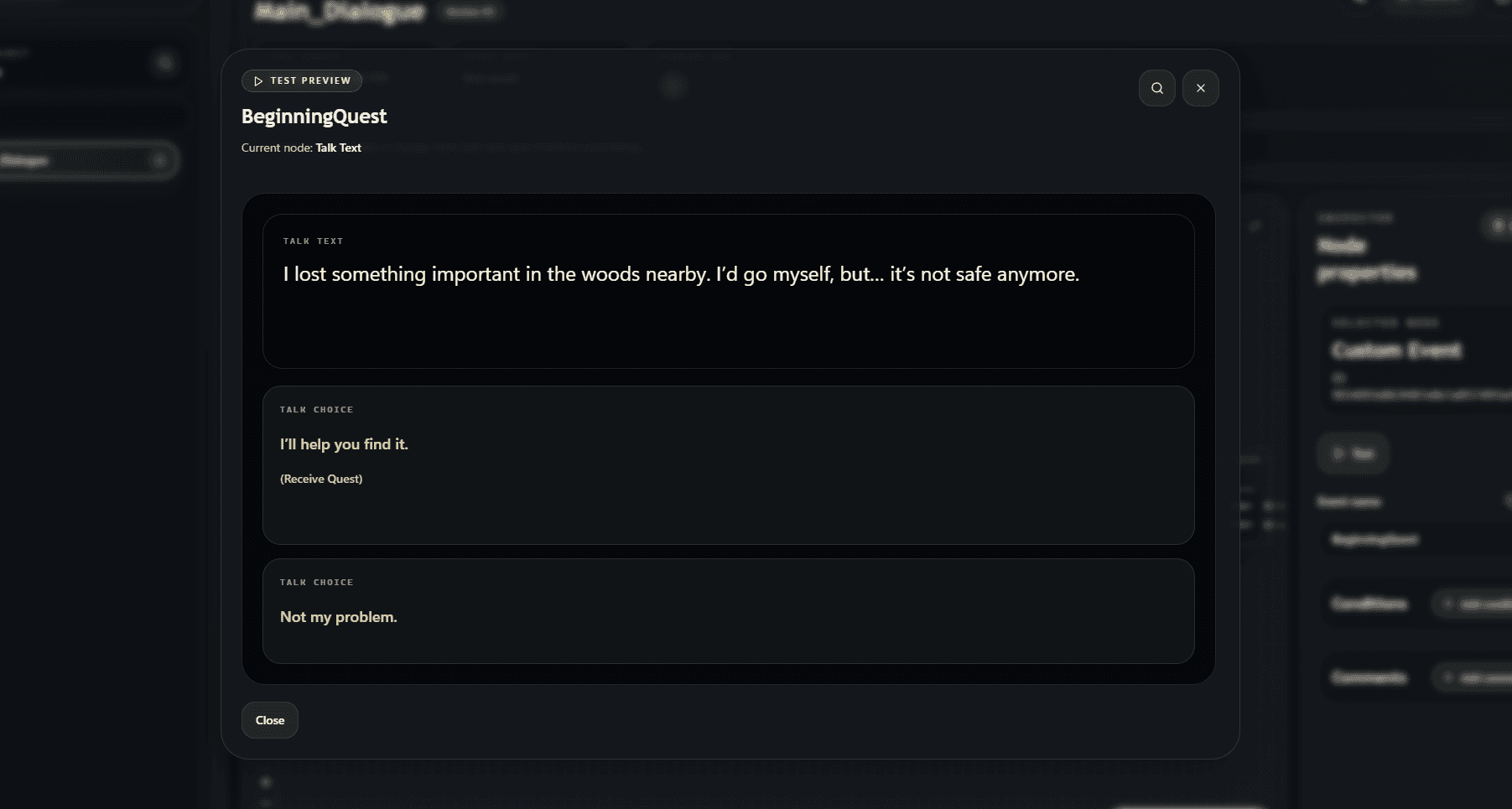
Launch the new test preview straight from a Custom Event, walk the active path, and verify dialogue flow in a focused reader instead of mentally reconstructing every wire.

Start from the exact conversation entry point

Follow dialogue flow, quest, rewards, and other events.

Return to the graph with context intact

Use the focus action to jump back to the current node and fix the exact step you're reviewing.

Dialogue graph with Talk Choice, Talk Text, Multi Talk Choice+, and the Custom Event inspector showing the Test button.
Test preview window showing talk text and multiple player dialogue choices.

Workspace model

Everything around the quest graph is part of the tool

The dialogue graph is only one layer of the workflow. As a quest design tool, the workspace keeps teams, project structure, shared data, reviews, locks, and versioned changes visible in one connected system.

Iron Vein Studio

Owner
3 members

Project

Frontier Campaign

Main
Town_Intro
Act 1
Forge_Entry
Side Quests
Missing_Miner

Workspace structure

One organization card, one active project, and one shared tree keep folders, graphs, and editing context visible in the same place while still letting teams freely move folders and graphs across the project structure.

Readable tree

Folders and graphs stay in one nested hierarchy, so the project structure remains easy to scan as dialogue grows.

Lock awareness

Locks sit directly on graph rows, which makes ownership and editing state visible before anyone opens the content.

Free access

Work together for free

Set up an organization with up to 3 members and collaborate in a shared workspace - with versioning, reviews, and no content limits!

* Available to individuals and organizations with annual gross revenue below USD 100,000.